
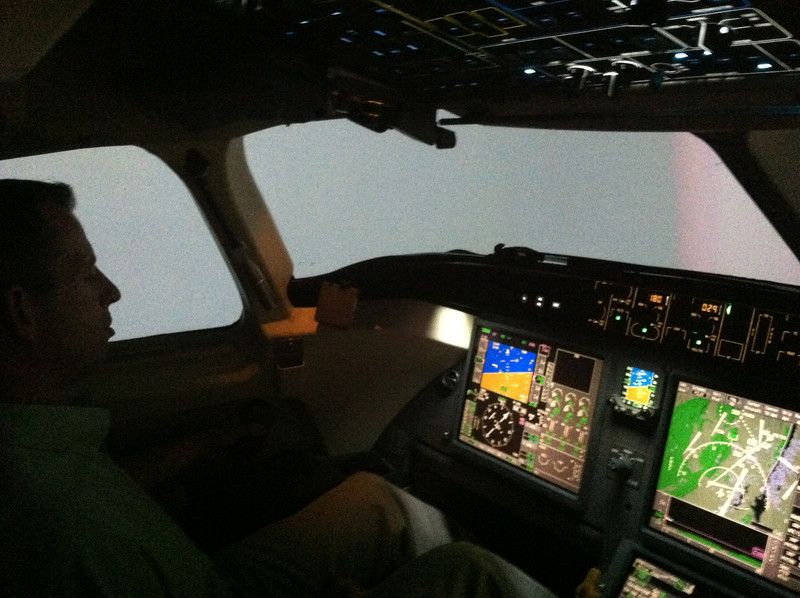
Flying the Dassault Falcon 7X Level D Simulator
From the 110 Knots archive. Originally published March 21, 2013, by Mike Bennett. View the original post.
The call I’d been waiting for finally came. It was my Falcon pilot friend, who will go unnamed for this story. He was scheduled for his 12-month check flight in the Falcon 7X and invited me to stop by for some free flight time.
I cleared it with the boss, left work early, and headed up to CAE. Once I arrived, he escorted me to the simulator. As we got closer, I have to admit I was a bit intimidated. I’d been away from flying for a little while due to other financial needs and wasn’t even IFR current or proficient in my Cessna 172, never mind a jet! NO PRESSURE.
After a quick review of the aircraft systems (okay, they showed me how to adjust the seat), we got started. We were positioned at a hangar at Teterboro, New Jersey (KTEB), ready to taxi. I applied some power… Not enough… Some more… Okay, now we’re moving. You steer the 7X with your feet, just like a Cessna, but it’s very sensitive. I taxied this thing like it was the first time I’d ever taxied an airplane. By this point, the instructor must have been thinking, “Who the hell is this guy, and why is he flying my multimillion-dollar simulator?” My friend kept assuring me that everyone has trouble taxiing, but I’m pretty sure I was one of the worst.
Time for takeoff
We lined up on Runway 19. I applied power, taking my time, and that’s when my friend pushed the thrust levers all the way up to the stops. I was immediately impressed by the sensation of acceleration the sim could produce. I was shoved back in my seat. MAN, THIS THING IS FAST! That runway goes away quick at 100-plus knots.
Rotation speed was around 120 knots. As I lifted the nose, my friend prompted me to move the sidestick all the way back. The fly-by-wire system took over and automatically trimmed the airplane for the climb. Flaps and gear came up, and again, the auto-trim made it feel seamless. I, on the other hand, had to learn how to fly a flight director. Now I saw the value in flying glass! It took me a few minutes to settle down and stop chasing the command bars. Once I did, it was actually easier than flying a 172.
Check that speed! We leveled off at 2,000 feet for a quick tour of New York City. As I leveled off, they told me to get the power back. I had the thrust levers set to about half, which was way too high. We’d already gone past the 200 knots we were aiming to stay under. I had to pull the levers back to pretty much idle to get down to 180 knots. With that out of the way, we moved on to some approaches.
The instructor set up some good old IFR weather. The snow effect was cool, kind of like Star Wars. They vectored me for the ILS to Runway 6 at Teterboro, and my friend configured everything else. My job was to fly the airplane. They offered to engage the autopilot, but I opted to hand-fly since I wanted the full experience of actually flying the 7X to the ground (preferably at an airport).

It was a lot to take in for the first time. Heck, I don’t even fly these things in my home flight simulator. But as I learned the flight director, things got easier. One of the things I found most helpful was the power command bar. On the primary flight display, I could see a bracket for the commanded thrust and match it with the thrust levers. When we selected a target speed, the bracket showed me how much thrust to set and moved as the airplane slowed and drag changed.

Flying the approach was surprisingly easy. One of the nicest things was how the flight director led me into it. A perfect intercept by a total jet newbie! That wouldn’t have been the case without the flight director and my friend setting everything up.

The first approach ended in a missed approach. Next up, the instructor repositioned us for some steep turns at 10,000 feet.
We started with some 45-degree bank turns. This is truly a breeze in the 7X. She’s well balanced and very responsive. The fly-by-wire auto-trim made me feel like I was missing something, a little like jumping from a stick shift into an automatic. Just set the power and bank her over. As we increased the bank, they demonstrated how the 7X would roll back toward a shallower bank when I released the sidestick. If memory serves, it rolled back to about 30 degrees.
Back to Teterboro for a final approach
This time, the instructor set us up a little high and fast. We chopped the power and dumped everything to get back down to the glideslope (something I’d only do in a sim). Once we were established, it was time to fly her all the way in. The weather was set to 800 feet, and once I broke out, I went visual. This was where I saw the advantage of flying glass again. In my airplane, my landing scan includes the airspeed indicator in the upper left corner of the panel. In the Falcon, it was a tape on the display, a bit lower than I was used to. Something I could get used to.
I dropped a few knots on short final, but my instructor brought it to my attention. I added some power, probably a bit too much, because I ended up passing my intended landing spot by about 1,000 feet! With a ker-plunk, I had arrived. It wasn’t as nice as my C-17 landing by a long shot, but I’ll take it. As we rolled out, the instructor called for reverse thrust. I had no idea how to engage it, so my friend stepped in.
Once again, I was back to steering with the rudder pedals. I couldn’t help but laugh at myself as I worked way too hard to stay on the centerline.
How real was it? When we stopped, I found myself shaking from the adrenaline rush. I’d say it was pretty close to the real deal.
A big thank you to my friend and my instructor for this experience!
Please leave your comments below.
Happy, safe flying, everyone…
